.png)
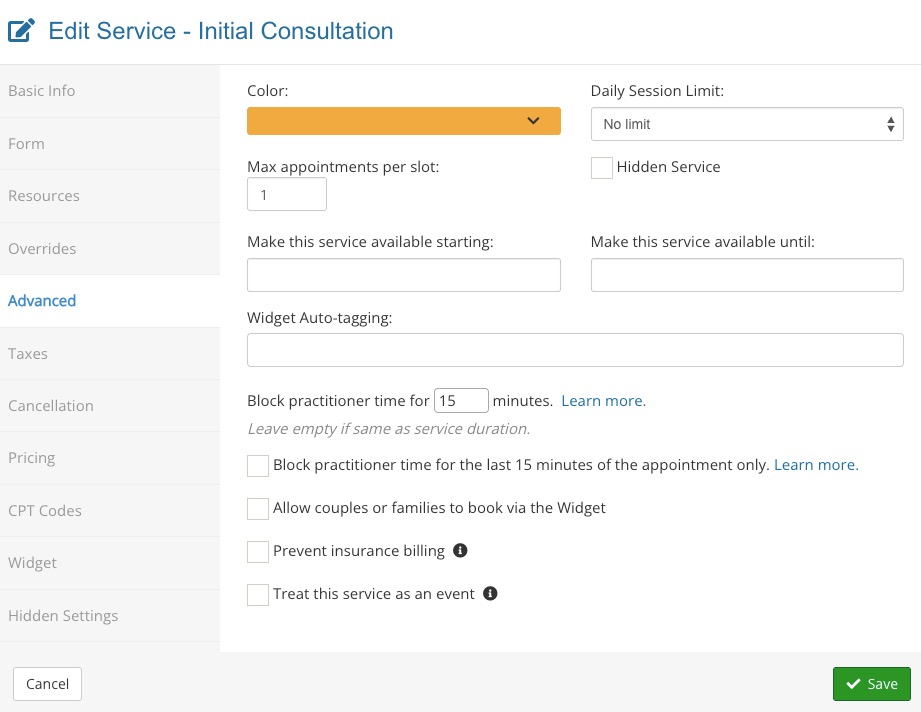
Available Setting: Prevent Appointment Overlaps
Did you know that the PracticeQ Team can enable a setting to prevent appointment overlaps? Read below for more information.
If you are interested in this setting, reach out to us at hello@intakeq.com.
With Prevent Overlaps Setting Disabled (default):
- When you set an appointment to block practitioner for x number of minutes, any other service can be booked after the practitioner's blocked duration.
With Prevent Overlaps Setting Enabled:
- This setting, when enabled for a specific service, will NOT allow other services to be booked if they overlap with the total duration of this service.
Example
A service has a set duration of 60 minutes, but it is set to block the practitioner for 15 minutes.
- Without the Prevent Overlaps setting, any service can be booked after 15 minutes.
- With the Prevent Overlaps setting, no other service can be booked until after the 60 minutes, but this service can be booked again after 15 minutes. This setting prevents overlaps with other services, but not with the same service.