.png)
Available Setting: Limit Daily Appointments
Does your practice need to enforce a daily appointment limit?
- At your request, the PracticeQ team can enable a setting that limits daily scheduled appointments for your practice.
- This setting is ideal for practices that need this limit across all services. If you wish to set limits for specific services, go to Bookings → Booking Settings → Services, and adjust the settings in the Advanced tab for the service.
If you choose to enable this setting, please keep the following in mind:
- The limit will apply equally across practitioners on the account. For example, if you set the limit to four appointments, all practitioners will be limited to four scheduled appointments per day.
- The limit will apply to all services, with no exceptions. For example, you cannot have a limit of four daily appointments for all service types except Emergency Visits.
- The limit will override the Limit Daily Session setting Advanced tab for any particular service but will not override the Max appointments per slot setting.
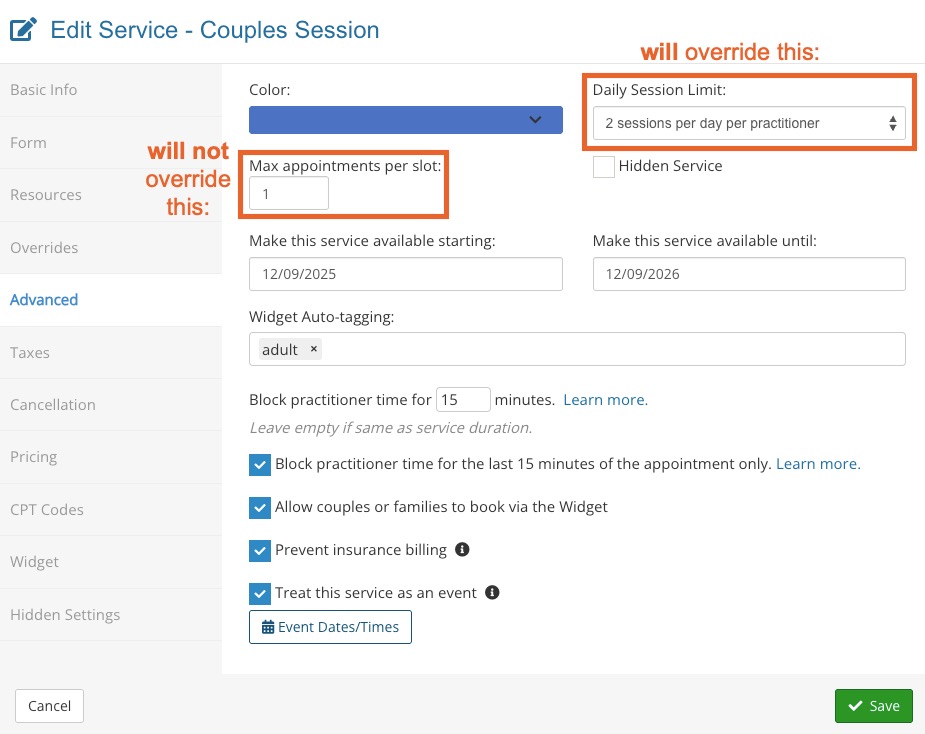
- The limit applies to the number of time slots used, not the number of clients scheduled.
- For example, if you book three clients in the 9:00AM time slot, four clients in the 10:00AM time slot, and two clients in the 11:00AM time slot, it will count as three appointments for the day, not nine.
Contact us at hello@intakeq.com if you are interested in enabling this setting for your practice.