.png)
How to Read an EDI
Electronic claims are transmitted in the 837P EDI (Electronic Data Interchange) format. Use this guide to understand the structure of an EDI file and interpret its claim data.
EDI files contain three components: Loops, Segments, and Elements.
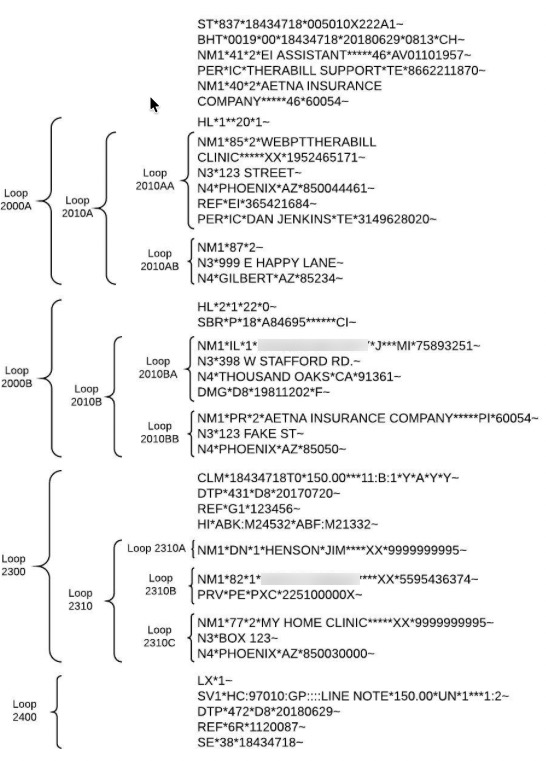
Loops
- Loops are groups of information about a claim.
- Loops typically begin with an HL or NM1 Segment.
- Loops contain 5 main sections. See screenshot below.
- 2000A = Billing Provider
- 2000B = Subscriber
- 2000C = Client (You will only see this if different from Subscriber)
- 2300 = Claim Information
- 2400 = Service Line Information
NOTE: Some payers require additional loops that differ from the ones listed above.
Segments
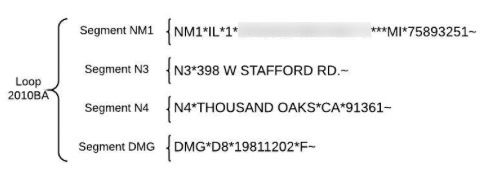
- Segments are contained within loops, and provide specific claim information.
- Each line of a segment begins with a segment identifier code:
- Each line of a segment ends with a tilde (~)
Common Segment Identifier Codes:
- PRV = Provider
- SBR = Subscriber
- NM1 = Name
- N3 = Street Address
- REF = Reference
- CLM = Claim
Other codes you may see:
- N4 = City, State, and ZIP
- DTP = Date
- DMG = Demographic
- HL = Hierarchy
- LX = Line
- SV1 = Service
Some payers require additional segments that differ from the ones listed above.
Elements
- Elements are contained within segments.
- Elements are separated by asterisks (*), which are also known as element separators.
- Elements are broken down into Sub-Elements, which are separated by colons (:)
- If you see multiple asterisks and/or colons next to each other, that means that Elements or Sub-Elements are empty.
- Elements begin with Element Identifier Codes.
Common Element Identifier Codes:
- 41 = Claim Creator (Hardcoded to EI Assistant)
- 40 = Claim Receiver
- 85 = Billing Provider
- 82 = Rendering Provider
- DN = Referring Provider
- IC = Information Contact
- 77 = Service Location
- 472 = Date of Service
- SY = Social Security Number
- EI = Tax ID (EIN)
- XX = NPI
- Y4 = Claim Casualty Number
- HC = Standard CPT Code
- ABK = Principal Diagnosis
- ABF = Diagnosis
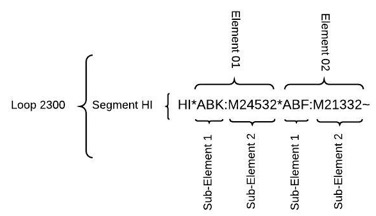
Element and Sub-Element Names
- Elements are named using 2-digit numbers
- Examples: Element 01, Element 02
- Sub-Elements are named using single digits
- Examples: Sub-Element 1, Sub-Element 2