.png)
NEW: Allow Unlisted Payers Setting
PracticeQ's new Allow Unlisted Payers on Patient Profiles setting lets clients enter insurance payers outside of your Payer List.
Locate the Setting
- Click Lists → Claims → Claims Settings.
- Select the Payers tab.
- On the top right, you will see a new toggle labeled Allow Unlisted Payers on Patient Profiles.

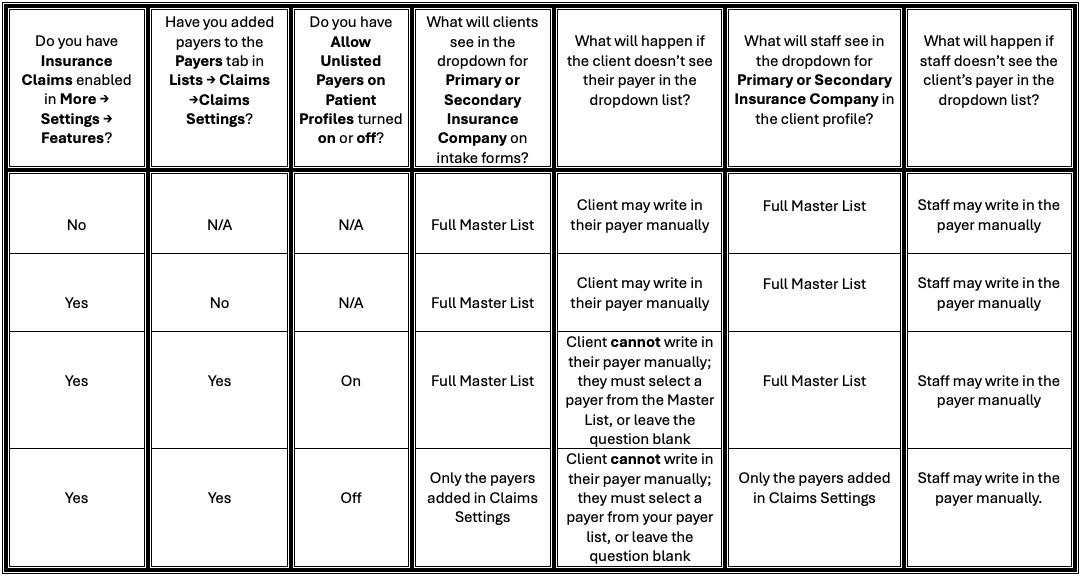
How will this setting work in my account?
Find your account setup in the chart below to see the expected behavior.
Note: Regardless of the settings you enter, your staff will always be able to manually enter a payer in the client profile.