.png)
Reassign a Form to Another Client
Sometimes the person filling out a form is not your client. It could be your client’s parent, teacher, spouse, etc. For these situations, you can transfer the form to your client's file so it’s easier to find later.
Note: The Reassign feature is only available for forms that have been submitted.
Follow the steps below to reassign a form to another client:
- Click Lists → Intakes.
- Click View for the submitted form you wish to reassign.
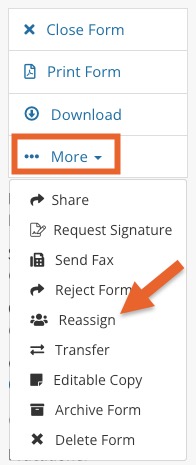
- On the right-menu, click More → Reassign.
- Enter the client name in the Reassign to Client window that displays. If the client already exists in the system, the email field will be populated automatically; otherwise, insert the client’s email address.
- Click the Reassign button.
The steps above will move the form to the client you selected while keeping the information about who submitted the form unchanged.