Users can own various components in PracticeQ, including clients, forms, and claims. Read on to learn how ownership is assigned and managed for each.
Clients
Each client in PracticeQ is owned by a single practitioner on the account.
Only the account admin or the current owning practitioner can change a client's ownership. They can do this by opening the client's profile and clicking the lock icon.
An assistant who is currently managing the account admin or the current owning practitioner AND has the Can Edit Clients permission can also change ownership.
Once the Access Control window opens, the admin/current owning practitioner can select a new owner in the Ownership dropdown menu and click Save.
Appointments
A practitioner owns the appointments booked on their calendar.
A practitioner does not have to own a client in order to book an appointment with them.
For example, Practitioner A could own Client A, but Practitioner B could own an appointment for Client A.
Appointment Packages
When an appointment package is created, it is created under a single practitioner. The package is therefore owned by that practitioner.
PracticeQ Support offers a backend setting that will allow you to book appointments in the same package with multiple practitioners. To turn on this setting, contact us at hello@intakeq.com.
Form Templates
Practitioners can own questionnaire, consent form, and note templates.
In the three dot menu → Settings, under the Settings tab, the practitioner who owns the template can elect not to share it with other practitioners, or to prevent other practitioners from changing it.
When a form is sent to a client, the form is owned by the practitioner who sent it.
A practitioner does not have to own a client in order to send them a form.
If an assistant sends a form to a client, the form is owned by the practitioner the assistant was managing when the form was sent.
Notes
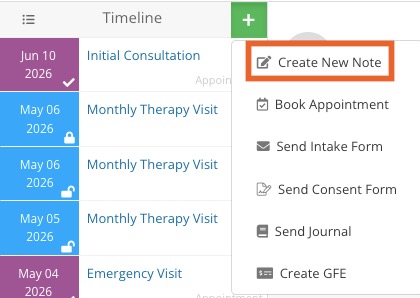
When a practitioner adds a note to a client timeline, the practitioner owns that note.
Other practitioners can edit the note, but it will still be owned by the practitioner who created it.
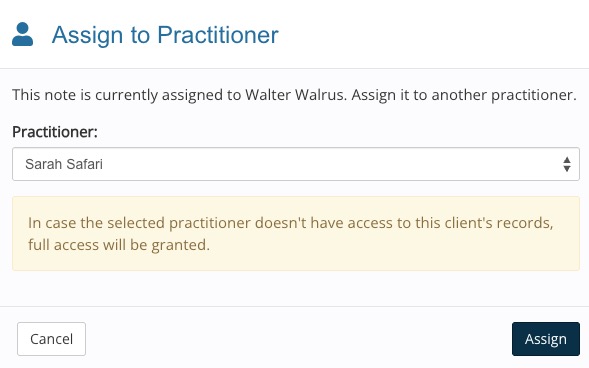
To change ownership of the note, the owning practitioner must open the note and select More → Assign to...
Invoices
Invoice ownership is determined in one of two ways:
If the invoice is attached to an appointment, then the invoice follows the appointment ownership.
If the invoice is created outside of an appointment, it is owned by the practitioner who generated it.
To transfer an invoice from one practitioner to another, open the invoice and click the practitioner's name beneath the client's name.
The Transfer Invoice to Practitioner window will display, allowing you to change the ownership.
Snippets
Treatment Note Snippets created by a practitioner will be owned by that practitioner.
Practitioners can share their Treatment Note Snippets with other practitioners. They must be shared with all practitioners; specific practitioners cannot be included/excluded.
Message Snippets in the Secure Client Portal are not owned by single practitioners; they are shared across the account.
.png)