.png)
Find a Client's ID
PracticeQ generates a client ID for each client in your account/timeline.
- Client IDs allow you to ask PracticeQ Support questions without sharing identifying information related to clients. Client IDs are only available to you and staff with access to that client.
- If you have questions regarding a client, email PracticeQ Support at hello@intakeq.com and provide the client ID. Support can then pass it to a Database Administrator (DBA) for review.
Client ID Digit Limits
- PracticeQ and IntakeQ show a 4-digit client ID.
- Any client with a 2 or 3 digit ID (such as client 32 or 745) will display a 4-digit ID (0032 and 0745). 4 digits is the minimum, with zeros used to fill the empty values.
- When a practice exceeds 10,000 clients, the client ID displays will expand to show the entire client ID (5, 6, or 7 digits).
- The system allows up to 7 digits for client IDs, which allows for 9,999,999 clients total. If your practice needs to exceed that number, please contact us at hello@intakeq.com, as our development team will need to review.
Find a Client's ID
- Access the client's timeline; use the magnifying glass icon and search their name/phone number/email/client ID, or click Lists → Clients.
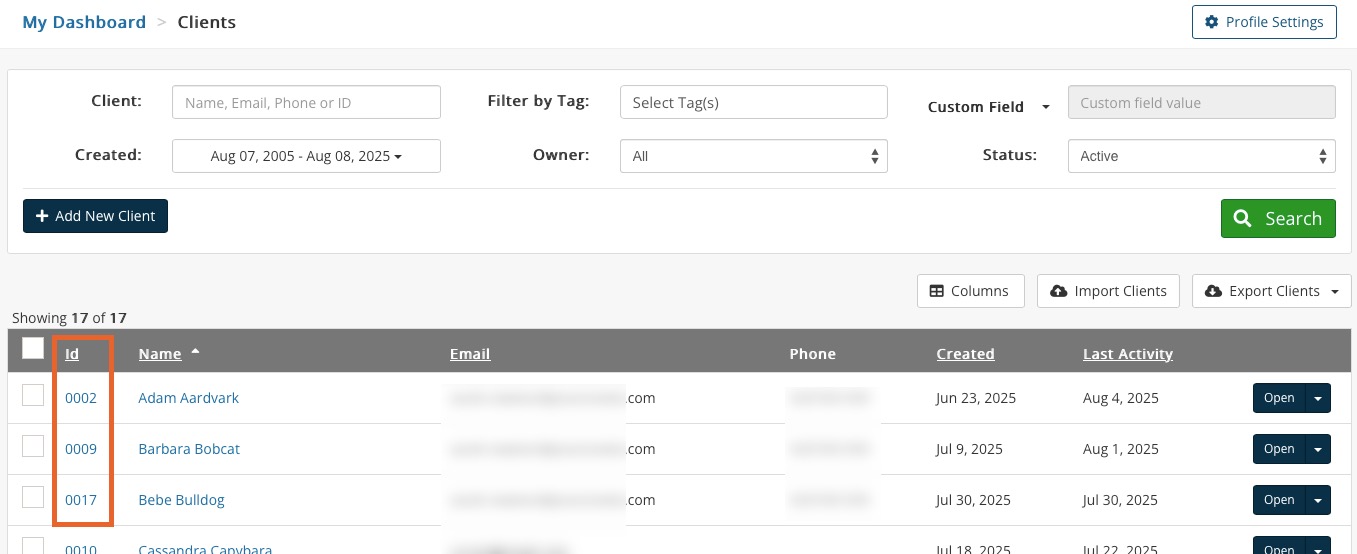
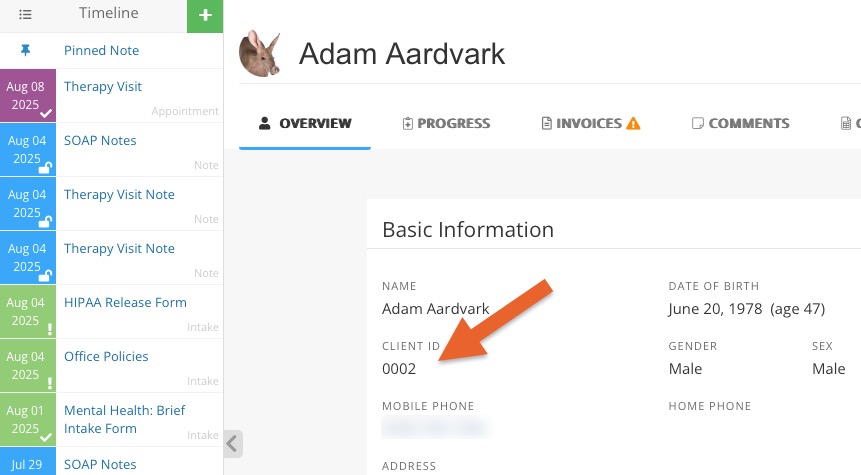
- The Client ID will display in two places:
- In the list of clients in the first column.
- In the client's Basic Information section, at the start of the second row.