.png)
Manage Tasks
Manage your team tasks to ensure nothing falls through the cracks!
- Once a task is created, you and team members can open it from the task list, add comments and even attach files.

- Setting a task as completed is as easy as opening the task list and clicking its check circle.

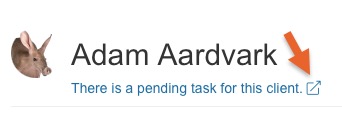
- You can also access tasks from the client profile. They system will display a warning right under the client name. Click the warning to open all the tasks associated with that specific client.
Note: Only tasks that are due in less than 24 hours and still pending will show in the Task Notification popup bubble.