.png)
What is the Secure Client Portal?
The PracticeQ secure client portal is a platform that allows you to communicate with your clients!
Why is it called the secure client portal?
- It's HIPPA-compliant!
- Clients access the portal via a secure sign-in process.
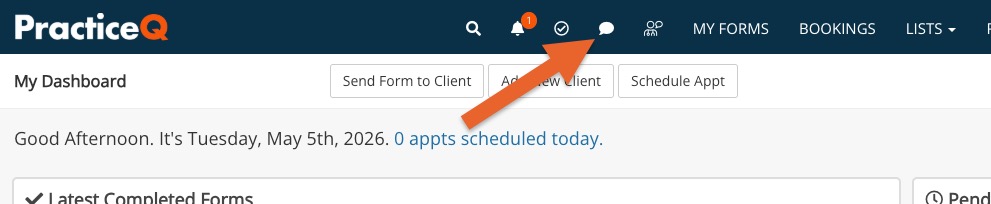
How do I access the secure client portal?
- Click the speech bubble icon from your PracticeQ toolbar.
 How do clients join the secure client portal?
 How do clients join the secure client portal?
You have two options. Learn more here.
- You can invite clients to the portal
- Clients can self-register for the portal.
What can staff do in the secure client portal?
- Send HIPAA-compliant messages
- Direct clients to the booking widget
- Share documents
- Send signature requests
- Send forms
- Send invoices
- Launch telehealth appointments
What can clients do in the secure client portal?
- Manage their credit card information
- Schedule appointments via the booking widget
- Review and sign documents
- Submit journal entries
- View invoices
- Print superbills
- View their Fullscript prescriptions/lab recommendations
