.png)
Format Text in the Secure Client Portal
While the secure client portal does not have a built-in toolbar with formatting options, it does support some text formatting through Markdown.
Text Box in the Secure Client Portal
- When using the secure client portal, you will see a simple text box that allows you to communicate with your clients.
- If you type into this box, you will see that there are no direct formatting options.
- However, PracticeQ supports a basic version of Markdown, which allows you to add certain formatting to posts.

Markdown Resource
- Find a list of the most widely used codes for Markdown formatting here: https://commonmark.org/help/
- This website shows what you type, and what the output would be:
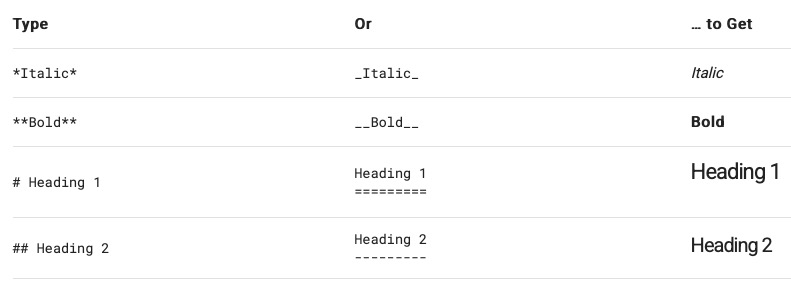
Note: Not all Markdown options are supported in our system. If you have any questions about supported/non-supported Markdown, please contact us at hello@intakeq.com - we're happy to help!
To learn how to invite clients to your secure client portal, check out the following articles: