.png)
Engage - Use the Dashboard
The Engage Dashboard is your one-stop shop for viewing all client communication.
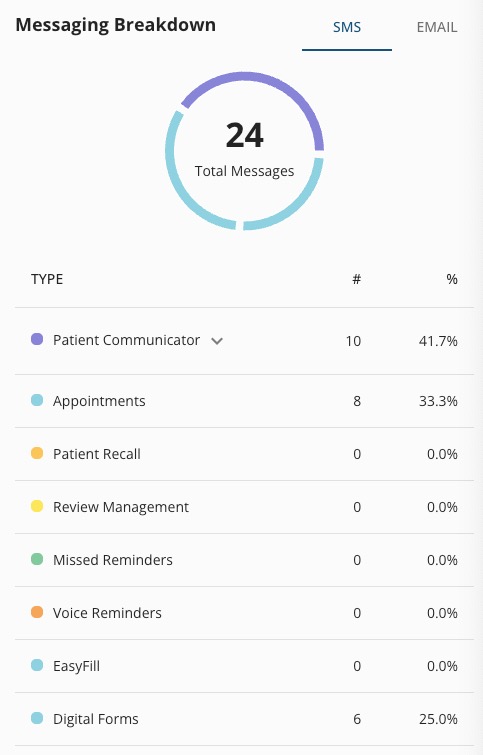
Messaging Breakdown
- Review all message types sent in the time frame
- Change the location using the dropdown menu on the top right
- Change the data date range by clicking the button below the location menu
- Toggle easily between the SMS and EMAIL tabs
Dashboard Metrics
- Appts Confirmed by Engage: Appointments that clients have confirmed by replying "C" to Confirmation Requests/Reminders.
- EasyFill Requests Filled: Appointment openings accepted by clients on your waitlist.
- Recalled/Recovered Appts: Appointments scheduled by clients who received a recall message.
- Confirmation methods: The number of ways your practice asks clients to confirm their appointments.
- Patient Opt Outs: The number of clients who opted out of Engage services in the time frame.
- Patient Feedback: Client responses to both internal and public feedback requests. Hover over the Feedback total to see the internal and public totals.
- Patient Communication: The total client messages in the Patient Communicator in the time frame. Each message of 160 characters or more is counted in this total.
- Total Public Reviews: The reviews written by clients on your public site.
- Broadcast Usage: How many clients you have sent broadcasts to compared to the monthly limit of 500.
- Campaign Usage: How many clients you have sent campaigns to compared to the monthly limit of 25,000.