.png)
Engage - Location-Specific Settings
All actions in Engage are location-specific, and each of your locations will send messages from a different outgoing number.
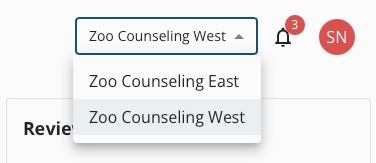
Use the dropdown menu on the top right of the Engage dashboard to view/select your practice locations.
Locate a location's outgoing texting number:
- Click Engage from your PracticeQ toolbar.
- Click the dropdown menu on the top right of the Engage dashboard.
- Select the location.
- Select Location Details from the toolbar on the left.
- In the the General tab, note the number in the Texting Phone field.

The following settings are location-specific and will follow the location where the client is scheduled.
Make sure to edit message templates, upload your logo, and connect social media accounts for all of your locations!
- Review request templates
- Google and Facebook account links
- Appointment reminders
- Appointment confirmations
- Missed Appointment Notices
- Recall settings
- Birthday Reminders
- Save the Date messages
- Thank You responses (to appointment confirmations)
- Patient Communicator threads
To learn more about Engage and how you can add it to your PracticeQ account, click here.