.png)
Engage - Customize Your EasyFill Templates
EasyFill sends text messages to clients alerting them to openings in your schedule. Customize these messages for your practice.
- Click Engage from your PracticeQ toolbar.
- Click Templates → EasyFill.
- Under the Manage Settings heading, you will see four message templates:
- Approval Template
- Denial Template (this is only available if Notify Denial is toggled on in your EasyFill settings)
- Request Single Template
- Request Multi Template
- Click on each template to view the wording.
- If desired, edit the message in the text box.
- Add or remove Variables as needed.
- Review the message preview on the right.
- Click SAVE.
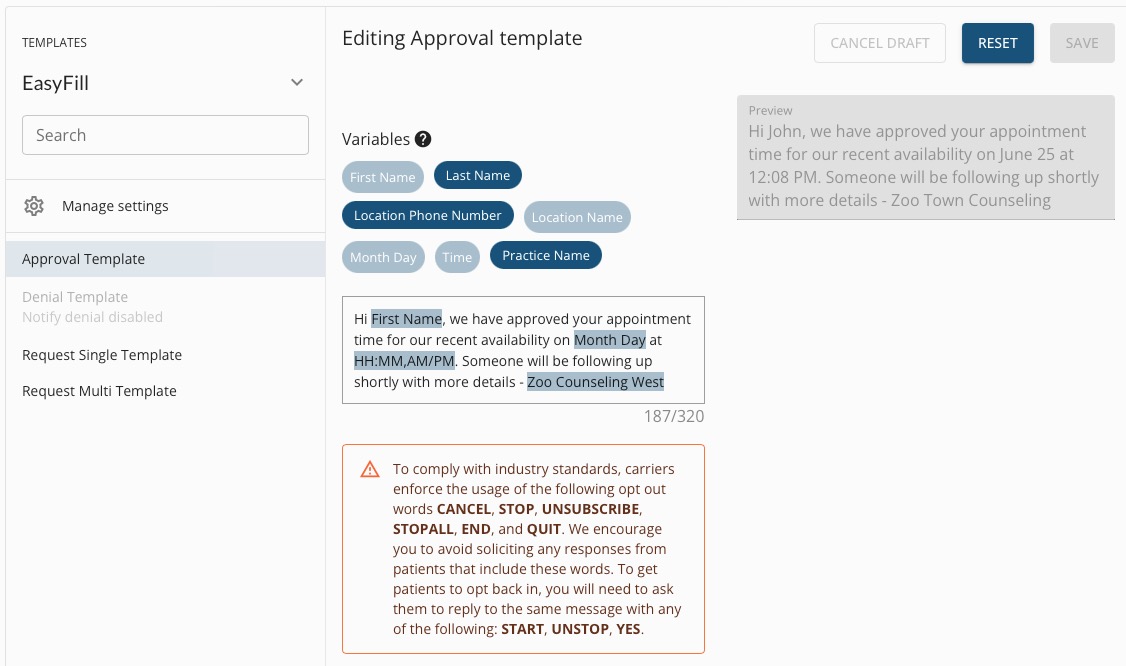
Note: Do not remove the Month Day or the HH:MM,AM/PM variables, as they pull the appointment date and time.
To learn more about Engage and how you can add it to your PracticeQ account, click here.