.png)
Make Your Questionnaires More Attractive
Customize your intake forms to make them look just right!
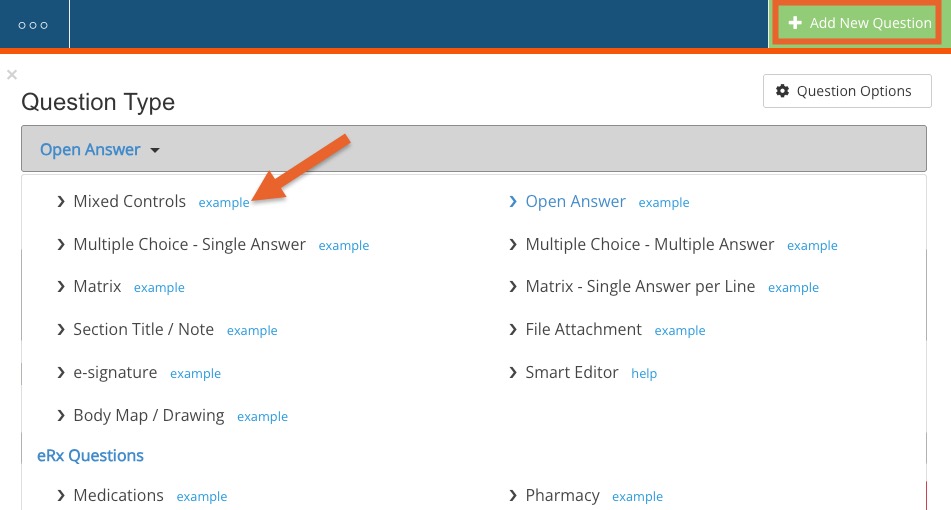
- PracticeQ's form editor offers you a wide variety of question types, assuring the form is displayed in a clean, intuitive, and dynamic way.
- Below shows all of the question types offered for questionnaires. Hover over the example links to see what each question type can do.
- Once your questionnaire has been created, let’s take a look at some changes that can be made to improve and customize your intake form’s appearance.
Interactive Mode
Interactive Mode can be enabled, which displays your questionnaire to clients one question block at a time.
To enable interactive mode, follow the steps below:
- Click My Forms.
- Click the form to open its editor.
- Click the three dots icon and select Settings.
- Check the box labeled Enable Interactive Mode.
Hide "Extras"
If you want less information displaying on your forms, here are some things you can do to further customize them:
Hide Progress Indicator:


From inside the form editor:
- Click the three dots icon and select Settings.
- Check the box labeled Hide progress indicator.
Hide Default Instructions:

From inside the form editor:
- Click the three dots icon and select Settings.
- Check the box labeled Hide default instructions.
To write your own instructions or note, do the following:
- Click the Add New Question button.
- Move the newly added field for question to the top of the form.
- Under Question Type, select Section Title / Note.
- Enter your new note/instructions under the Section Text area.
Custom Header
This can make a huge difference. Your intake form's header can display a logo or other images of your choice, business information, etc.

Customize the form header for your entire account:
- Click More → Settings.
- You will land in the Form Header tab by default. Check the Enable Custom Header option.
- As you start creating your header, a preview of what it will look like will display below. Use the Header Helper to assist you.
If this looks too complicated, contact us at hello@intakeq.com and we’ll create your custom header for free.